Step 3: Positional Encoding
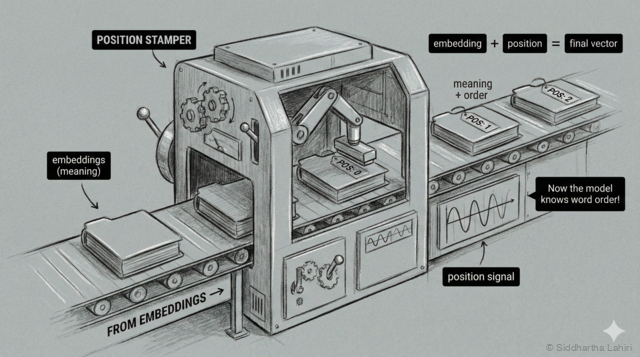
At the third station, each embedding gets stamped with its position number — like seat assignments in a theater. This "position stamper" ensures the model knows the order of words.
We have a problem. Look at these two inputs:
| Input | Answer |
|---|---|
| "five minus three" | "two" |
| "three minus five" | "negative two" |
The words are the same, but the order matters. With just embeddings, the model sees the same three vectors in both cases—it doesn't know which word came first!
The solution: we add position information to each embedding. Think of it like seat numbers in a theater—each word gets a fixed position marker:
For "two plus three":
| Position | Word | Embedding + Position → Final |
|---|---|---|
| 1 | "two" | [0.9, 0.1, ...] + [pos 1] → [0.92, 0.15, ...] |
| 2 | "plus" | [0.1, 0.8, ...] + [pos 2] → [0.13, 0.85, ...] |
| 3 | "three" | [0.85, 0.15, ...] + [pos 3] → [0.88, 0.21, ...] |
Now each vector contains both what the word is AND where it appears. The same word at different positions will have slightly different vectors.
The Context Window
Our calculator handles short inputs like "two plus three" (3 words). But real LLMs process thousands of words at once—this is called the context window.
| Model | Context Window |
|---|---|
| Our calculator | ~10 tokens |
| GPT-3 (2020) | 4,096 tokens |
| GPT-4 (2023) | 8,192 - 128,000 tokens |
| Claude (2024) | 200,000 tokens |
With longer contexts, position becomes critical. Imagine a 10,000 word document—the model needs to know if a reference to "the company" appears in paragraph 1 or paragraph 50. Positional encoding makes this possible by giving every position a unique signature.